



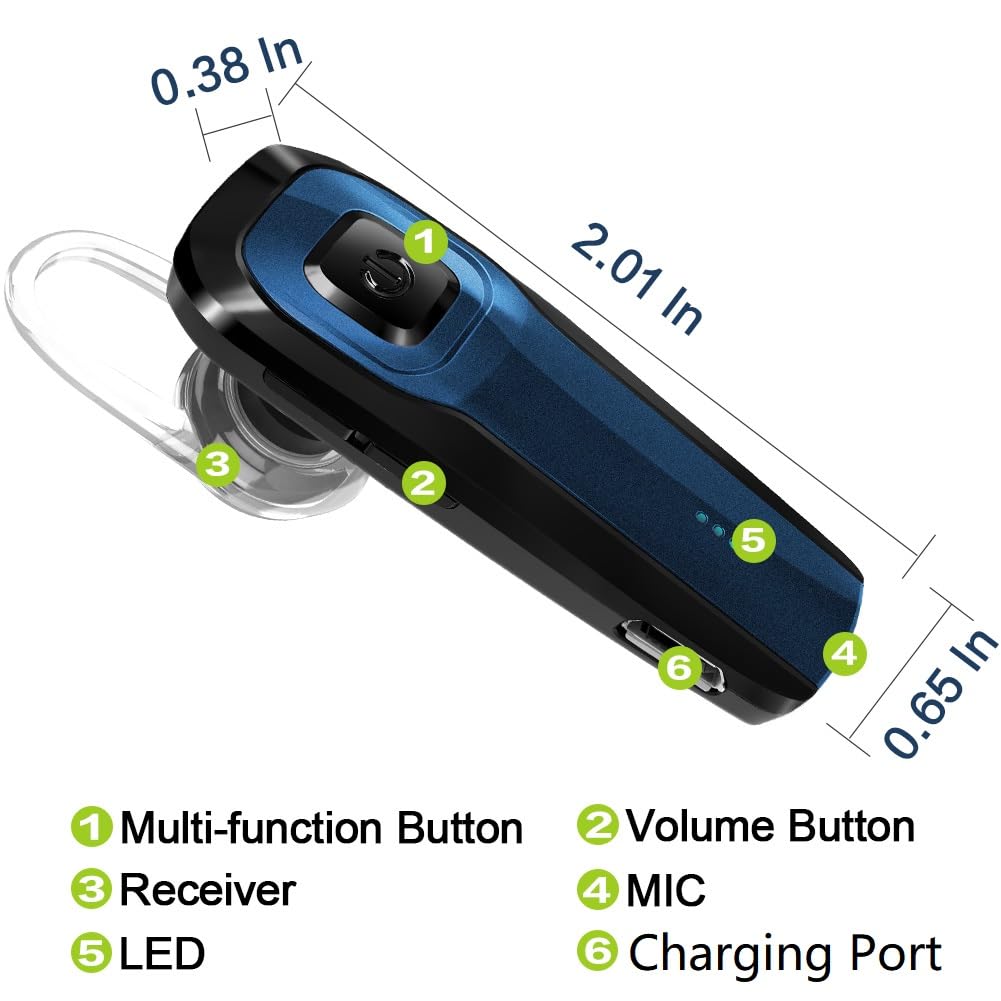


TOORUN Bluetooth Earpiece, M26 Bluetooth Headset Handsfree V5.0 Wireless Earpiece Headphone with Noise Reduction and Microphone Compatible for Android iPhone Cell Phone Laptop - Blue
- [Not Water Resistance ] - Not waterproof. This Bluetooth earpiece does not have waterproof function, so try to avoid water ingress when using it
- [VOICE PROMPT FUNCTION] - TOORUN Bluetooth headset for cell phone could activate SIRI and reminder user "Battery high/Medium/Low", "Power on/on" ,"Pairing", "Connected/Disconnected" via voice.
- [PAIR WITH 2 BLUETOOTH DEVICES] - Bluetooth phone earpiece can pair with 2 Bluetooth devices. (How to connect two cellphones: 1. pair with the first mobile, then turn off both the Bluetooth headset and the Bluetooth function of the first mobile phone. 2. Turn on the headset again(Long press 5-8 seconds, make headset pairing status), pair with second mobile phone as normal. 3. Turn on the Bluetooth function of your first phone. the headset will connect the first again. Then 2 mobiles connected)
- [STRONG AND LONG LASTING BATTERY] - This TOORUN M26 Bluetooth headset handsfree can play music continuously for 13 hours. you can all day enjoy this bluetooth earpiece no charging anxiet.
- [WIDE COMPATIBILITY AND CLEAR SOUND] - TOORUN Bluetooth phone earpiece is compatible with iOS,Android smart phones and mainstream Bluetooth devices.This M26 Bluetooth earpiece offers truly natural,clear sound. Noise Cancellation and Louder sound make your calling clear.
| Control Method | Touch, Voice |
| Compatible Devices | Smartphones, Bluetooth Devices |
| Manufacturer | TOORUN |
| Unit Count | 1 Count |
| Specific Uses For Product | connect with phone to talk or play music |
| Controller Type | Touch and Voice |
| Brand | TOORUN |
| UPC | 612046172117 |
| Control Type | Siri |
| Number of Items | 1 |
| Connectivity Technology | Bluetooth |
| Model Name | M26 |
| Water Resistance Level | Not Water Resistant |
| Colour | Blue |
| Global Trade Identification Number | 00612046172117 |
| Impedance | 16 ohm |
| Item Weight | 7.94 g |
| Customer Package Type | Box |
| Audio Driver Type | Dynamic Driver |
| Bluetooth Range | 10 meters |
| Age Range Description | Adult |
| Model Number | Tr-M26 |
| Style Name | Classic |
| Additional Features | Microphone Included |
| Product Type | Single Ear Bluetooth Headsets |
| Built-In Media | 1x Bluetooth Headset 1x USB charging cable 2x Ear hooks 2x Earbuds 1x User Manual 1x Standard box |
| Enclosure Material | Plastic |
| Battery Charge Time | 1.5 hour |
| Headphone Jack | Type-C |
| Headphones Ear Placement | In Ear |
| Earpiece Shape | In Ear |
| Noise Control | None |
| Battery Average Life | 13 hours |
| Bluetooth Version | 4 |
| BuiltIn Media | 1x Bluetooth Headset 1x USB charging cable 2x Ear hooks 2x Earbuds 1x User Manual 1x Standard box |
| Cable Features | Tangle Free |
| Wireless Technology | Bluetooth |
| Headphone Folding Features | In Ear |
-
Save 10% when you buy two or more items.
-
Get 5% off your next purchase.
-
Enjoy free delivery on orders above $200.
-
Orders are processed and shipped from Washington


3-6 days (Domestic)



Confidence-backed purchases with 30-day return support.

USD |
BRSWKGAIPIBWEDD4 |
Category |
Accessories , Single Ear Bluetooth Headsets |
Tags |
Estimated shipping
Select a product to estimate shipping.How to operate
Answer the call: Click MFB Redial the last dialing: Double Click MFB Refuse the call: Press MFB 3 seconds
Music Play/Pause: Click MFB Previous Track: Press Vol+ 3 seconds Next Track: Press Vol- 3 seconds
Volume Up: Click Vol+ Volume Down: Click Vol- Power off: Long press MFB 5 seconds
How to reset to defaults
In the state of power-on, press MFB and Vol- simultaneously until the red and blue lights filcker.
Problem-Solving Steps
If your Bluetooth headset and phone experience connection issues, please follow these steps:
1. Turn off the Bluetooth headset, then turn them back on to see if they can reconnect automatically.
2. If the headset and phone fail to reconnect, reset the Bluetooth headset to defaults settings.
3. We also recommend deleting the Bluetooth device name from your phone and reconnecting.
Technical Details:
- Bluetooth version: Bluetooth V5.0
- Bluetooth Profiles: CVC6.0 Noise reduction
- Operation Range: 10M
- Talk Time: About 10 hours
- Music Time: About 10 hours
- Charge Time: 1.5 hours
How to Pair:
1.Before using the headset, please use the USB charging cable to charge it first.
2.Press the power button for 5 seconds until you see the blue-red light blinking alternately, it will automatically enter pairing mode.
3.Make sure your phone's bluetooth function turned on, search headset model name M26 to click.
Package Includes: 1x Bluetooth Headset, 1x USB charging cable, 2x Ear hooks, 2x Earbuds, 1x User Manual, 1x Standard box
Product details


Shipping & Delivery
At GofinchKart Australia, we aim to deliver your order quickly and safely.
Domestic Shipping (Australia):
Orders are typically delivered within 3–7 business days.
International Shipping:
Estimated delivery time is 12–26 business days, depending on the destination and customs processing.
Once your order has been dispatched, you will receive a tracking number. Delivery times may vary during public holidays or due to unforeseen delays.